

Overview
Improve Kendo Grid sorting for freight systems with custom compare functions. Handle mixed dates, currencies, and codes for accurate, user-friendly data views.
In any freight management system, users expect to sort and find information effortlessly, so accurate sorting is essential.
Whether it’s booking dates, shipment charges, or container marks, users need to find the right information quickly and trust that what they see is correct.
Kendo Grid makes basic sorting simple— for plain numbers, strings, and dates, you can just enable “sortable: true” and it works perfectly.
But real-world data is rarely so simple. Some columns contain formats, symbols, units, or mixed data types that break default sorting. This blog shares three real examples where we made sorting more reliable with small custom tweaks—helping both dev team and end users.
1. Dates and Links in the Same Column
The challenge
A single grid column sometimes shows a processed date or a document link (depending on the booking status).
The API sent dates as YYYY/MM/DD, which we converted to Date objects— but links stayed as strings.
Default sorting couldn’t handle both correctly, so we added a custom comparison function.
Our solution
This function sorts valid dates properly and ensures dates always appear before links.
// Sorts a column that may contain dates or links, keeping dates first
var dateSortingComparer = function (fieldName) {

    return function (a, b) {

        const valA = a[fieldName];

        const valB = b[fieldName];


        // Handle empty values first

        if (!valA && !valB) return 0;

        if (!valA) return -1;

        if (!valB) return 1;


        const isDateA = valA instanceof Date;

        const isDateB = valB instanceof Date;


        if (isDateA && isDateB) return valA - valB;

        if (!isDateA && !isDateB) return String(valA).localeCompare(String(valB));

        return isDateA ? -1 : 1; // Dates come first

    };

};
Result
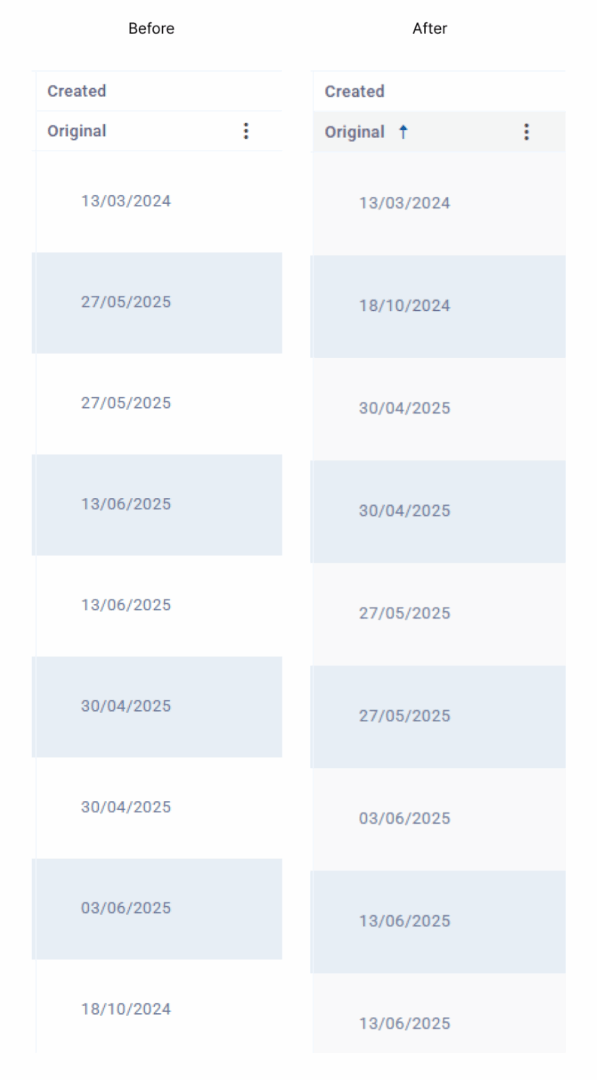
Users see bookings with dates grouped together and links at the end, making the grid clear and consistent.
2. Numeric Values with Units or Symbols
The challenge
Columns for charges or quantities often include units:
- Example: “$205.05”, “€1,200”, or “100 BAG”
Visually clear, but default sorting treats them as text — so $20 could appear below $200.
Changing the data type to a plain number wasn’t practical — we needed the units for display and exporting.
Our solution
This custom function strips the symbol/unit safely and sorts by the actual number.
// Sorts numeric values that include currency symbols or units
var unitAwareNumericComparer = function (a, b, field) {

    const parseValue = (value) => {

        if (!value || typeof value !== 'string') return null;

        const trimmed = value.trim().replace(/^[$£€]/, '');

        const match = trimmed.match(/([+-]?\d+(?:,\d{3})*(?:\.\d+)?)/);

        return match ? parseFloat(match[1].replace(/,/g, '')) : null;

    };


    const valA = parseValue(a[field]);

    const valB = parseValue(b[field]);


    if (valA === null && valB === null) return 0;

    if (valA === null) return 1;

    if (valB === null) return -1;


    return valA - valB;

};
Result
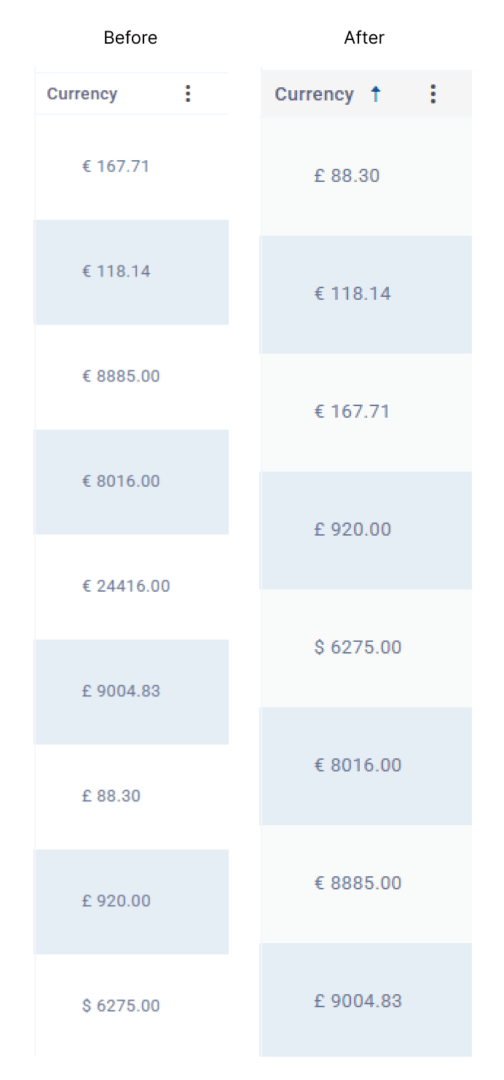
End users see neat currency formats on screen, but behind the scenes, the grid sorts them as true numbers— no confusion.
3. Complex Mixed Codes and Identifiers
The challenge
Some columns contain mixed codes that don’t follow simple number or text rules — for example:
- Negative numbers (“-20”)
- Positive numbers with prefixes (“100A”)
- Alphanumeric IDs (“AB123”)
- Empty or blank entries
The goal was:
- Negative numbers come first.
- Numeric prefixes sort next.
- Pure strings sort alphabetically.
- Empty values last.
In real operations— whether it’s freight containers, asset tags, or custom product codes— users expect these to appear in a logical, consistent order, not just an alphabetical list.
Our solution
This function groups values by type— negatives, numbers, alphanumeric codes, or blanks— and sorts each group in an order that makes sense to the people using it.
// Sorts mixed numeric and alphanumeric codes in a logical order
var mixedCodesComparer = function (a, b) {

    const getGroupKey = (value) => {

        if (!value || value.trim() === "") return 3; // Blanks last

        if (value.trim().startsWith('-')) return 0;  // Negative numbers first

        if (/^\d+/.test(value.trim())) return 1;     // Pure or prefix numbers next

        return 2;                                    // Alphanumeric or text last

    };


    const valueA = a.CodeField || "";

    const valueB = b.CodeField || "";


    const groupA = getGroupKey(valueA);

    const groupB = getGroupKey(valueB);


    if (groupA !== groupB) return groupA - groupB;


    const extractPrefix = (val) => {

        const match = val.trim().match(/^(\d+)/);

        return match ? parseInt(match[1], 10) : null;

    };


    const numericA = extractPrefix(valueA);

    const numericB = extractPrefix(valueB);


    if (numericA !== null && numericB !== null) return numericA - numericB;

    if (numericA !== null) return -1;

    if (numericB !== null) return 1;


    return valueA.trim().localeCompare(valueB.trim(), undefined, { sensitivity: "base" });

};
Result
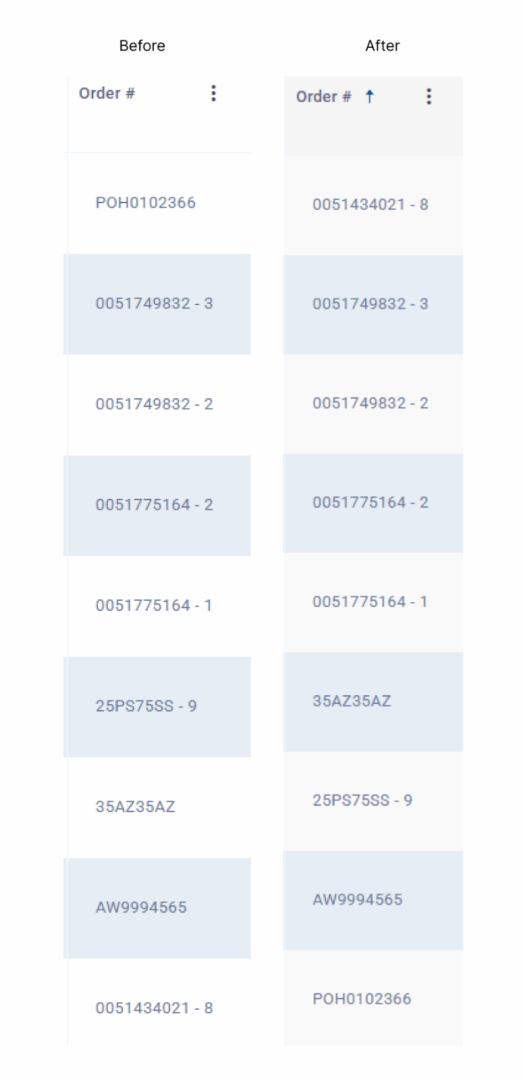
This keeps lists of mixed numbers, codes, and labels easy to read and sort- whether they’re asset numbers, reference IDs, or booking codes. Users can trust they’ll see entries in an order that feels natural and predictable.
Conclusion
When columns mix symbols, units, different formats, or non-standard values, a small custom compare function makes sorting accurate— without rewriting your schema or breaking other features. These small custom comparers keep Freight Management System’s grids intuitive and reliable, saving users time and confusion.
If your team is dealing with complex data and needs more reliable, user-friendly sorting in your application, we’re here to help. From implementation to optimisation, we deliver practical solutions that enhance usability and performance. Contact us now to streamline your data handling and improve user experience.
WRITTEN BY
July 13, 2025, Product Development Team
Top Categories
- Software Development ................... 7
- AI in Business ................... 5
- Digital Transformation ................... 5
- Technology ................... 3
- Uncategorized ................... 3